
WordPress is an open-source content management system (CMS) built on PHP and MariaDB that allows you to create, manage, and modify website content without writing code from scratch. Released initially in 2003, the software is licensed under the GPLv2, granting users the freedom to run, study, redistribute, and modify the platform for any purpose.
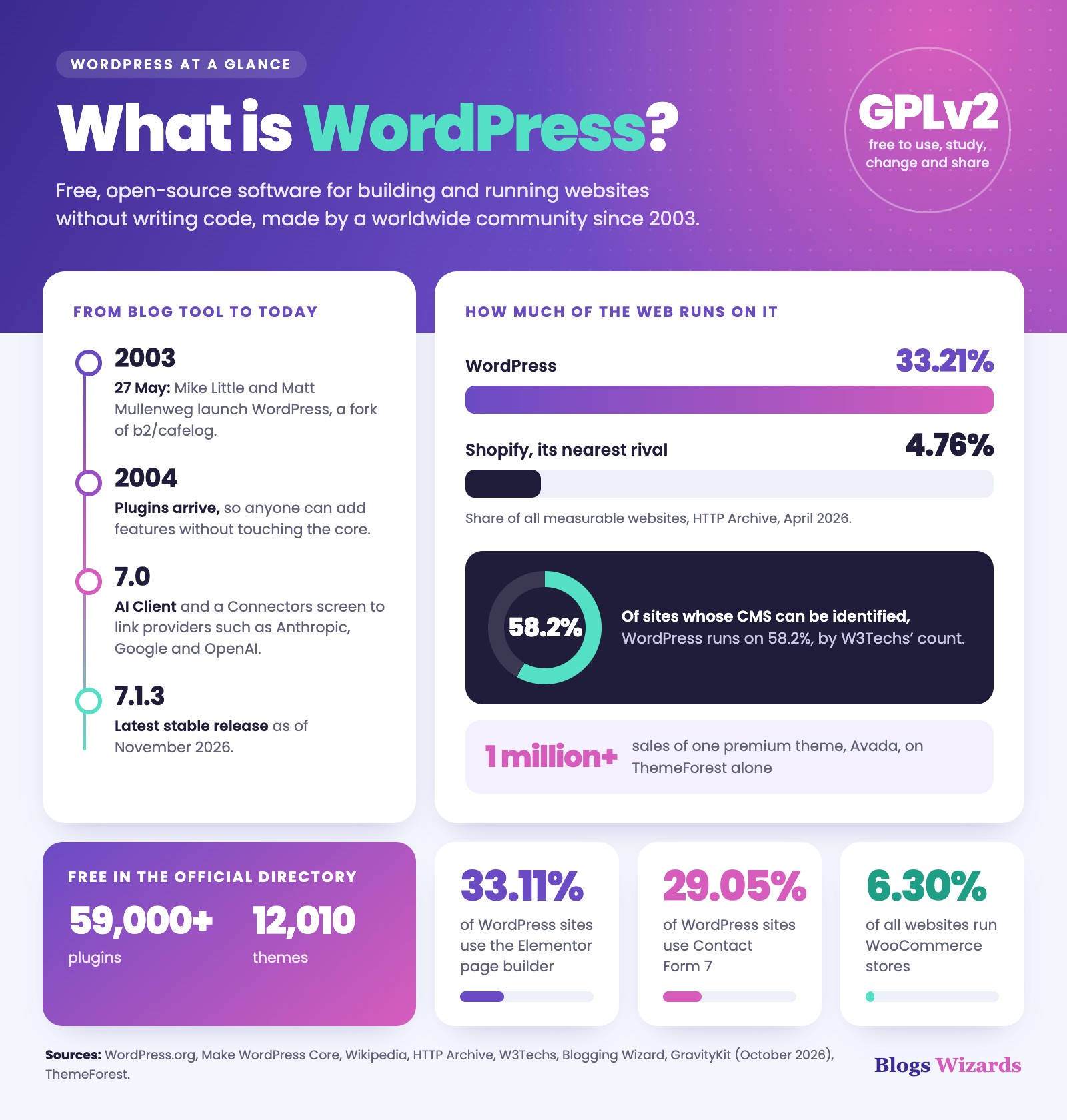
The platform began as a simple tool for writers, but it has since grown into the backbone of a massive portion of the internet. It started as a fork of b2/cafelog and was officially launched on May 27, 2003 by Mike Little and Matt Mullenweg. Their goal was to create an elegant, well-architected personal publishing system that did not require a computer science degree to operate. Today, the software is maintained by a global community of contributors and powers an estimated 40.2% of all websites as of October 2026.
As of November 2026, the latest stable release is WordPress 7.1.3. The platform continuously evolves to meet modern web standards. For example, the 7.0 release introduced an AI Client and a new Settings → Connectors screen, where a site owner can connect AI providers such as Anthropic, Google and OpenAI.
To see how dominant the platform is, compare it with its nearest rival. In April 2026 HTTP Archive data, WordPress ran on 33.21% of all measurable websites, against 4.76% for Shopify (source). W3Techs, which counts only sites whose CMS it can identify, puts WordPress at 58.2%.
Blogs Wizards
How do themes and plugins extend your website?
Themes control the visual design of your website, while plugins add specific features like contact forms, search engine optimization tools, and e-commerce capabilities. The official directory currently offers over 59,000 free plugins and 12,000 free themes, allowing you to build everything from a simple portfolio to a complex online store.
The turning point for the platform arrived in 2004 when the developers enabled users to add these extensions. This extensibility is why the ecosystem is so vast. For instance, the official directory lists over 59,000 free plugins and 12,010 free themes. You can find a tool for almost any requirement, from SEO optimization to advanced caching.
For online stores, WooCommerce is the standard choice, running on 6.30% of all measurable websites. If you need to capture visitor emails, Contact Form 7 remains the most popular tool, detected on 29.05% of WordPress sites as of October 2026. For visual design, page builders like Elementor lead the market, appearing on 33.11% of WordPress sites. Premium themes also drive a massive economy, with Avada passing 1 million sales on ThemeForest alone.
To add a new feature safely, navigate to Plugins → Add New in your dashboard, search for the tool you need, and click Install Now followed by Activate. Always back up your site and use a staging environment before installing new plugins, as a single conflicting file can break your live site.
What is the difference between WordPress.org and WordPress.com?
Blogs Wizards
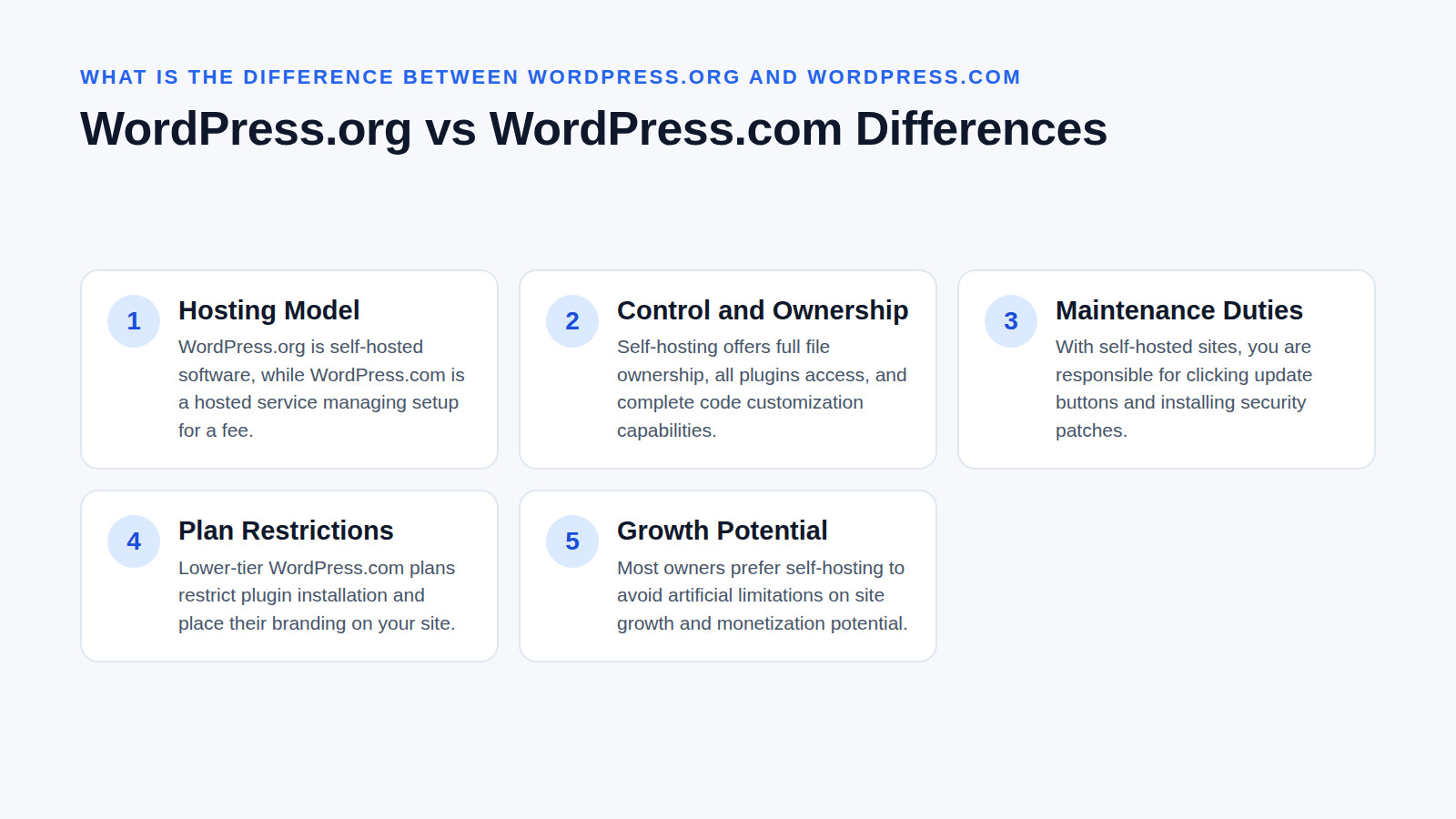
WordPress.org provides the free, self-hosted software you install on your own web server, whereas WordPress.com is a hosted service that manages the technical setup for a fee. Choosing the self-hosted WordPress.org version gives you full ownership of your files, complete access to all plugins, and the ability to customize every line of code.
When you download the software from the official project website, you are getting the exact same core files that power millions of sites. You pair this free software with a domain name and a web hosting account. This route gives you total control, but it also means you are responsible for clicking the update buttons and installing security patches.
WordPress.com, particularly on the lower-tier plans, restricts which plugins you can install and places their branding on your site. While the hosted version handles server maintenance for you, most small business owners and bloggers ultimately prefer the self-hosted route to avoid artificial limitations on their site’s growth and monetization potential.
How does the WordPress block editor build your pages?
Blogs Wizards
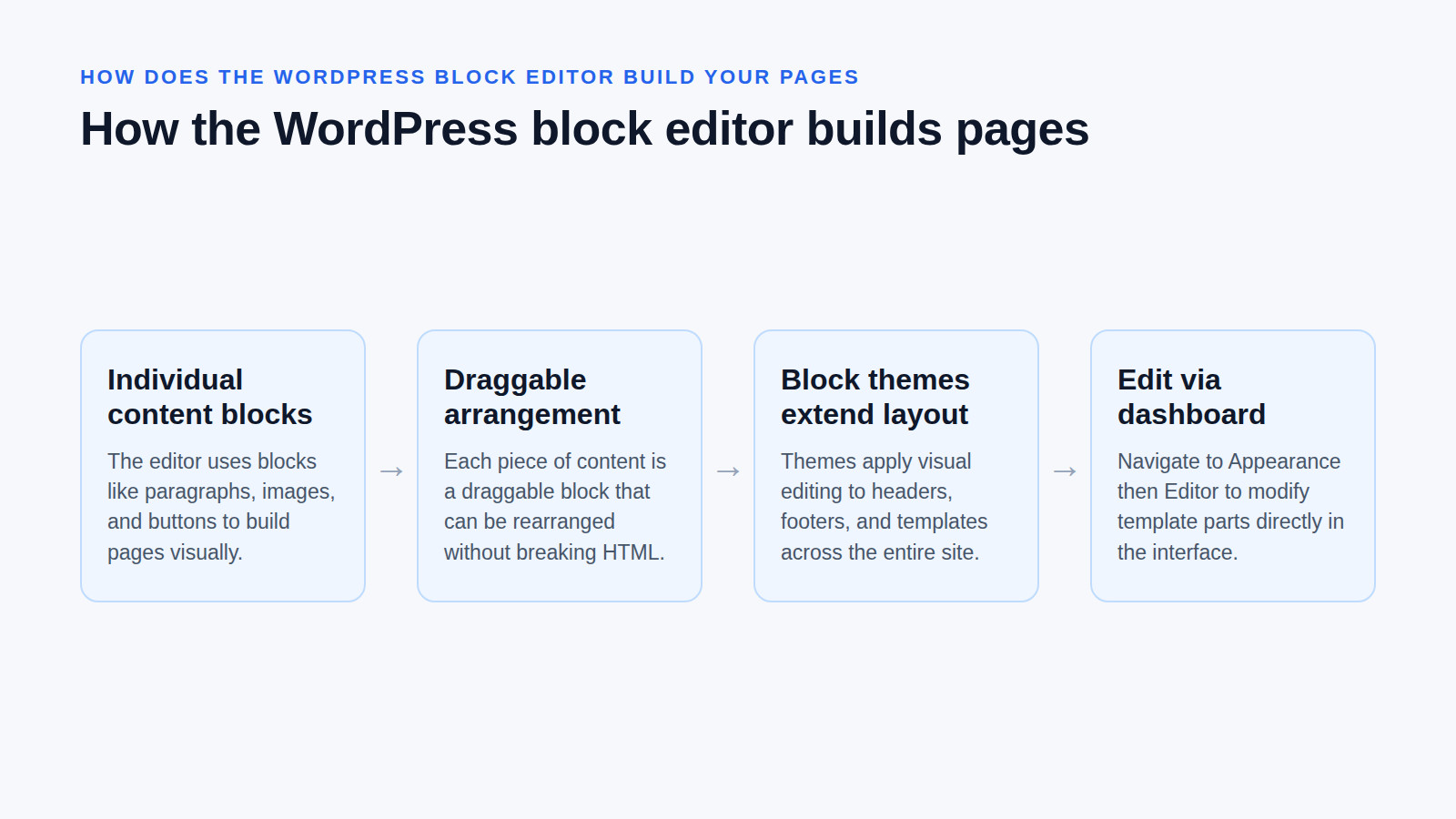
The block editor uses individual content blocks—like paragraphs, images, and buttons—to build pages visually without requiring custom code. Block themes extend this visual editing experience to your entire site layout, letting you modify headers, footers, and templates directly through the dashboard interface.
Before the block editor (often called Gutenberg), WordPress relied on a classic text editor that looked a bit like Microsoft Word. The modern block approach treats every piece of content—a paragraph, an image gallery, a pricing table, or a button—as an individual, draggable block. This makes it incredibly easy to rearrange your content without worrying about breaking the underlying HTML structure.
Block themes take this concept further by applying the visual editor to your entire site structure. Instead of digging into theme files to change a footer, you can edit the footer template directly in the dashboard. To access the visual editor for a block theme, navigate to Appearance → Editor in your dashboard. From there, you can click on any template part and modify it visually.
When should you choose a different platform instead?
Blogs Wizards
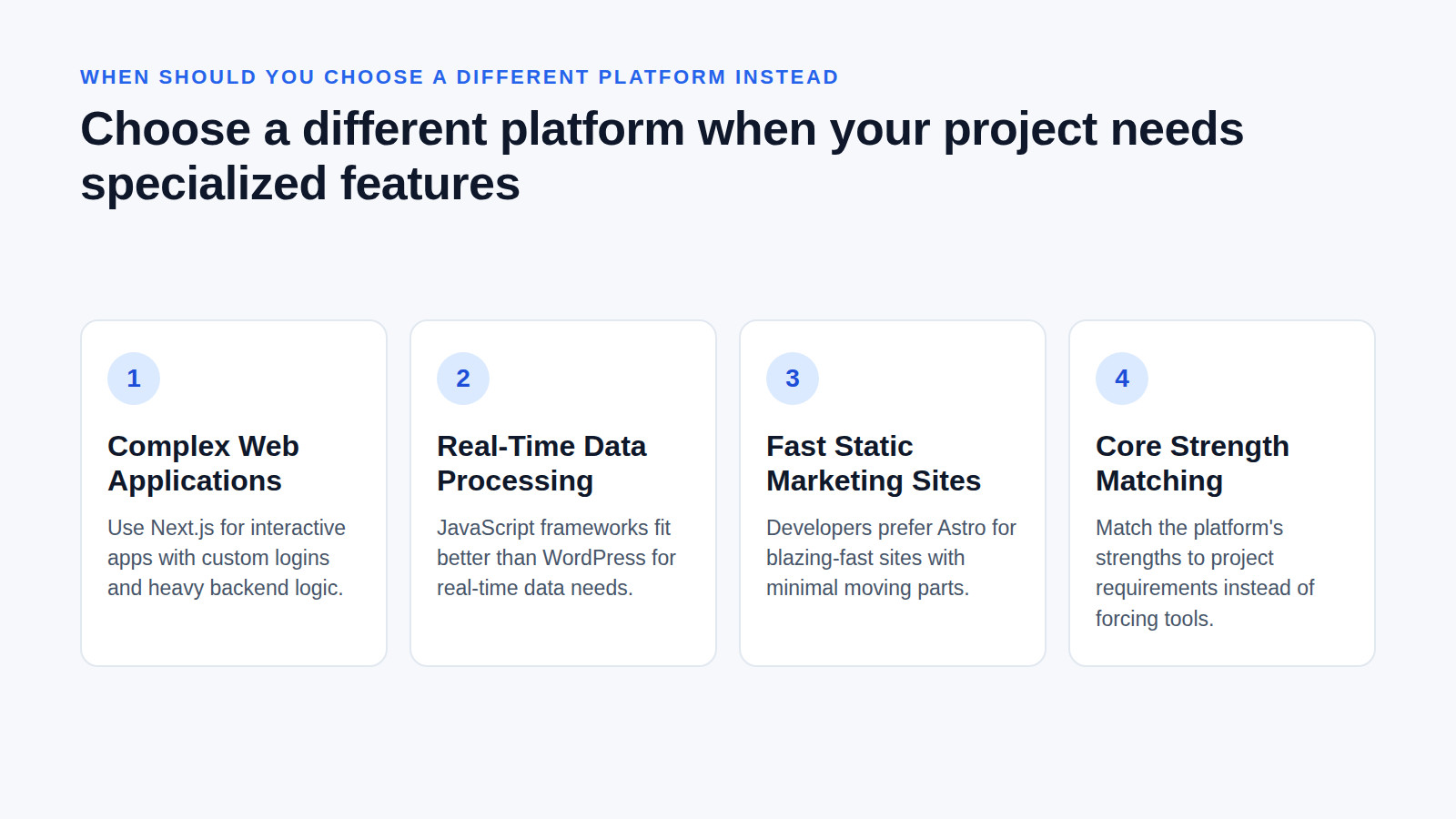
WordPress excels at content-heavy sites, blogs, and standard business pages, but it is not the optimal choice for every single web project. Developers often prefer specialized frameworks like Astro for extremely fast static marketing sites, or Next.js for complex web applications requiring custom user logins and heavy backend logic.
WordPress is highly versatile, but it is fundamentally a content management system optimized for publishing. If your primary goal is to build a highly interactive web application with complex user dashboards, custom database logic, and real-time data processing, a JavaScript framework like Next.js is usually a better technical fit.
Similarly, if you need a blazing-fast, static marketing site with minimal moving parts, developers often reach for specialized frameworks like Astro. Choosing the right tool means matching the platform’s core strengths to your specific project requirements, rather than forcing a CMS to do a developer framework’s job.
Frequently asked questions
Is it hard to learn WordPress?
Learning the basics of WordPress takes only a few hours, as the dashboard uses intuitive menus for creating posts, uploading media, and managing pages. While mastering advanced customizations requires understanding PHP and CSS, beginners can comfortably build and maintain a professional website using the visual editor and pre-built themes.
The interface is designed to be approachable for non-technical users. You do not need to know how to code to write a blog post, upload a gallery of images, or create a new page. As you grow more comfortable, you can gradually explore more advanced settings like permalinks and menu structures at your own pace.
What is the downside of WordPress?
The primary drawback of running a self-hosted WordPress site is the ongoing responsibility for security updates, backups, and performance optimization. Because the platform relies on third-party themes and plugins, poorly coded extensions can introduce vulnerabilities or slow down your page load speeds if you do not monitor them carefully.
Unlike a fully managed hosted service where the provider handles everything, self-hosting means you must actively maintain your site. You need to regularly update your core software, themes, and plugins. It is highly recommended to always back up your site and use a staging environment before applying major updates to prevent accidental downtime.
Can I learn WordPress in 3 days?
You can certainly learn how to install WordPress, activate a theme, and publish your first pages within three days of focused study. However, becoming proficient in advanced troubleshooting, plugin configuration, and search engine optimization requires ongoing practice and a deeper understanding of how the underlying content management system operates.
In a single weekend, you can comfortably set up your hosting, install the software, pick a design, and write your first few posts. But mastering how to configure caching plugins, set up an online store, or troubleshoot a white screen of death error takes weeks or months of hands-on experience.
Can I earn money in WordPress?
You can generate income through a WordPress site by selling physical products via WooCommerce, offering digital downloads, or monetizing a blog through advertising and affiliate links. The platform supports numerous payment gateways and membership plugins, allowing you to build diverse revenue streams directly from your own domain.
Because you own the site, you are not restricted by the monetization rules of a third-party platform. You can sell your own courses, accept donations, offer consulting services, or run display ads. The extensive plugin ecosystem ensures you can integrate almost any payment processor or affiliate network you need to get paid.
Reviewed by Shahid Anwer · Editorial standards
